
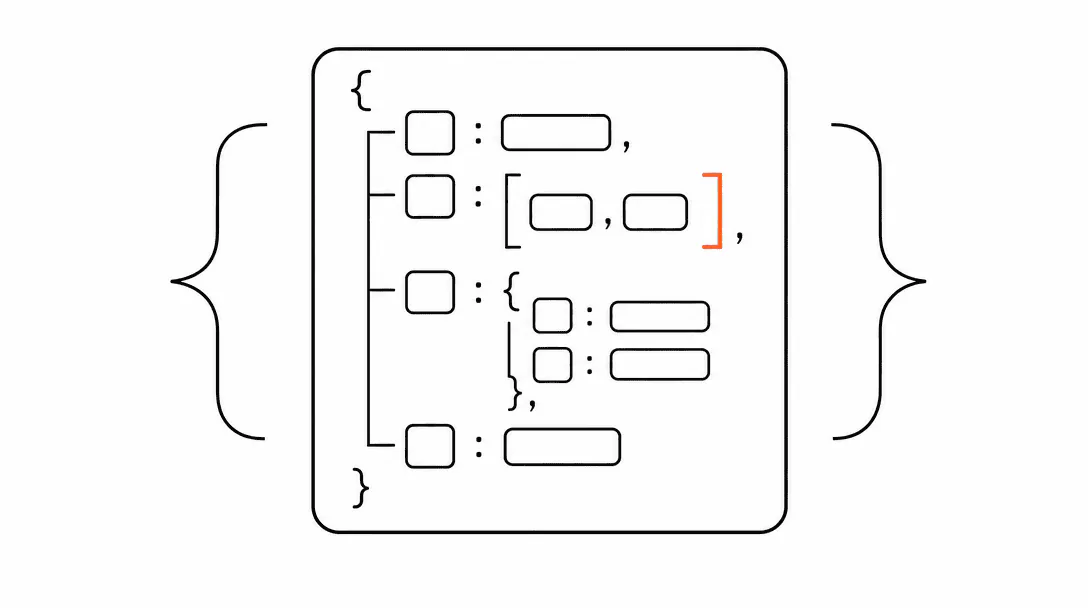
Schema markup is a block of structured data you add to your website's code. It tells Google, Bing, and AI search engines exactly what kind of business you are, what services you offer, which cities you serve, and what your hours are. Without it, search engines have to infer that information from your page text, and they do not always get it right.
For a local service business, schema is infrastructure. It is the machine-readable layer that sits underneath your visible content and pipes organized facts directly into the algorithms that fill map packs, Knowledge Panels, and AI Overviews. Getting it right is a one-time systems build with compounding returns. This guide covers what you need, why each piece matters, and exactly how to implement it. It is part of a broader cluster on SEO, AEO, and GEO for service businesses if you want the wider picture first. Schema is one of the core deliverables inside our Visibility services, which covers visibility infrastructure for service businesses across Stuart, Jupiter, Port St. Lucie, and the surrounding Treasure Coast.
What is schema markup and why does Google want it?
Schema markup is a shared vocabulary for describing things on the internet, maintained at Schema.org, that search engines agreed to read as a reliable signal about a page's content. Think of it as a label on a file folder: the text inside the folder is your webpage, but the label tells the filing system exactly what category it belongs to without reading every word.
Search engines have always had to make inferences from natural language. Your homepage might say "we fix air conditioners in Palm Beach Gardens," and Google can usually figure that out. But when there are ten competing HVAC companies in the same area, all with similar page text and comparable reviews, the ones whose sites speak the machine's language clearly have a systematic edge. Schema is that language.
The stakes went up in 2024 and 2025 as AI Overviews and AI-driven search results grew. AI systems trained on web data weight structured, citable information more heavily than unstructured prose. The same logic applies to how your business gets cited when someone asks ChatGPT or Perplexity a question that you should be answering. Getting cited in AI search increasingly depends on having clean, verifiable, structured data attached to your pages.
What schema types does a local service business actually need?
Four schema types cover roughly 90 percent of what matters for local search: LocalBusiness, areaServed, OfferCatalog, and FAQPage. Everything else is secondary. Start here, get these right, and you will be ahead of most of the competition in your market.
LocalBusiness (and its subtypes)
LocalBusiness is the base type that tells Google you are a real physical or service-area operation. You declare your name, address (or service area), phone number, hours, and a description. The power comes from using a specific subtype instead of the generic label. Schema.org has subtypes for nearly every trade: HVACBusiness, Plumber, ElectricalContractor, MedicalBusiness, BeautySalon, LegalService, and many more. The subtype tells Google with zero ambiguity what kind of business this is, which feeds directly into category matching for the local map pack.
Your name, address, and phone number in the schema should match your Google Business Profile exactly, character for character. This is the NAP consistency principle extended to your site's structured data. Inconsistencies create conflicting signals that dilute rather than build trust.
areaServed: where your schema does the heavy lifting
This is the property that most local businesses miss entirely, and it is one of the most valuable ones you can set. areaServed is a list of the geographic areas you actually serve: cities, zip codes, counties, or named regions. You can list multiple values.
When we add OfferCatalog and areaServed to a service-area business for the first time, Google Search Console usually starts surfacing new impression data on service-plus-city queries within 30 to 45 days. The schema creates signal that was simply absent before. Your page text might mention "Jupiter, FL" twice, but the structured areaServed property tells Google that Jupiter is a declared service territory, not just a passing mention. That distinction matters for how the algorithm weights your relevance to searches originating in or mentioning that city.
For a business that covers multiple cities, list every market explicitly. If you serve Palm Beach Gardens, Jupiter, Tequesta, and Juno Beach, all four should appear in the areaServed array. Do not rely on Google to infer your territory from page content alone.
OfferCatalog: your services as structured data
OfferCatalog lets you describe each service you offer as a discrete item with a name, description, and optionally a price range. This is valuable for two reasons. First, it gives Google a machine-readable list of your actual offerings, which feeds service display in search results. Second, it helps AI systems answer "does [business name] offer [service]?" with confidence rather than inference.
The structure nests under your LocalBusiness block. Each service gets its own Offer object with a name, a description, and a priceSpecification if pricing is somewhat predictable. For service businesses where quotes vary, you can express a minPrice and maxPrice or simply omit the pricing node and focus on the service name and description.
Keep descriptions factual. "AC tune-up and coil cleaning for residential systems" is better than "comprehensive HVAC maintenance package." The former maps to real search queries; the latter maps to marketing copy that search engines discount.
FAQPage: the schema type that feeds AI answers directly
FAQPage schema wraps the questions and answers on your page in a structured format that AI search engines can pull verbatim. When someone asks Google's AI Overview "how much does AC repair cost in Jupiter?" and your page has a well-written FAQ answer wrapped in FAQPage schema, you have a better chance of being the cited source.
The questions should match how real customers phrase things: "how long does a roof inspection take?", "do you offer same-day service?", "what areas do you serve?", "what is your cancellation policy?". Write the answers as if you are explaining to someone who called your office. Then wrap both in the schema, with the answer text matching the visible on-page text verbatim.
What does schema markup actually look like in code?
Schema markup is delivered as JSON-LD: a block of JSON (JavaScript Object Notation) embedded in a <script> tag inside your page's <head>. It is completely invisible to site visitors but fully readable by search engine crawlers and AI systems. Here is what the skeleton of a LocalBusiness block looks like, stripped to its structure:
You open a @context pointing to Schema.org, declare @type as your specific business type (say, HVACBusiness), then list your name, address, telephone, hours, and description. The areaServed property holds an array of place names or postal codes. The hasOfferCatalog property nests your OfferCatalog block. Close it all with a valid JSON structure and Google's crawlers can read it on their next pass.
One block on the homepage handles the core LocalBusiness declaration. Service pages can carry additional schema specific to that service. Your FAQ page or any page with an FAQ section carries the FAQPage block. The blocks do not fight each other; they stack to build a richer structured data picture of your business.
For a more complete walkthrough of what goes in each field, the companion post on llms.txt and schema in plain English covers the syntax in detail alongside the emerging llms.txt standard. Both belong to the same infrastructure layer.
What happens when a competitor has schema and you do not?
Consider an HVAC company whose website had zero structured data. A competitor three miles away with almost identical reviews was appearing in AI Overviews for every "AC repair near me" variant because they had LocalBusiness schema with areaServed set. Same city, similar reputation, similar site age. The difference was not the visible page content; it was the machine-readable layer underneath it. The business without schema was invisible to the systems making the selection, even though a human reading both sites would have considered them equally qualified.
This is the operating reality right now. Google's AI Overviews pull from structured, verifiable signals. When a business has clean LocalBusiness schema with explicit service territories and an OfferCatalog, the algorithm has a cleaner path to featuring them. When a business has none of that, the algorithm defaults to competitors who do, even if the underlying quality is comparable.
of consumers regularly read online reviews before choosing a local business, a behavior that AI Overview citations directly influence.
The reviews piece connects to schema because ReviewAction and AggregateRating properties can be included in your LocalBusiness block, pulling your review count and average rating into structured form. This is not just for star displays in search results; it is another signal that tells Google your business has a real track record in a real location.
How do you actually add schema to your website?
The path depends on how your site is built. On a custom-coded static site, a developer adds the JSON-LD block directly to the <head> of each relevant page. On WordPress, plugins like Rank Math or Yoast SEO handle basic LocalBusiness injection through a settings panel, though the output needs to be reviewed for completeness. Webflow has a project settings panel where you can paste a head code block directly. Shopify and Squarespace have varying levels of schema support depending on the plan and template.
Regardless of how it gets in, the validation step is non-negotiable. Google provides a free Rich Results Test at search.google.com/test/rich-results. Paste your URL or paste the raw JSON, and the tool tells you whether the schema is valid, what types it detected, and whether there are errors. Run this every time you add or modify schema. A malformed JSON block is worse than no schema because it can create parsing errors that confuse crawlers.
Common errors to catch: unclosed brackets, trailing commas in arrays, mismatched quotation marks, and using the wrong property name (for example, serviceArea instead of areaServed). These are easy to make and easy to fix if you validate before considering it done.
After validating, use Google Search Console's URL Inspection tool to request a re-crawl of pages where you added schema. This does not guarantee a faster index but signals to Google that the page has been updated and is worth a fresh look.
How does schema affect AI search and AI Overviews specifically?
AI Overviews and the AI search layer more broadly are trained on structured, citable content. Schema markup is one of the clearest signals available that your content is organized, factual, and trustworthy. The SEO, AEO, and GEO landscape has shifted toward systems that reward businesses able to present information in a format that AI can process without interpretation.
FAQPage schema is particularly valuable here because it pre-structures question-and-answer pairs that AI systems are designed to surface. When a user asks a conversational question, AI Overviews look for content that already has the structure of a Q&A. FAQPage schema is a direct map to that format. The answer text you write in the visible FAQ on your page should be the same text that goes into the schema's acceptedAnswer field: no paraphrasing, character-for-character identical.
Beyond FAQ, the combination of LocalBusiness with areaServed and OfferCatalog creates what you might think of as a machine-readable business card. AI systems answering "who does [service] in [city]?" are looking for exactly this data structure. A business that has it is answerable; one that does not is a guess.
The on-page SEO checklist for service businesses covers the broader page-level factors that work alongside schema. Schema is the infrastructure layer; on-page content quality is the substance that makes the infrastructure meaningful.
Does schema need to be maintained over time?
Schema is not a set-it-and-forget-it build, but it is close. The main triggers for updating it are real business changes: new service areas you have expanded into, new services you are offering, a change in hours, or a new phone number. Each of those changes should flow through to your schema at the same time they go onto your Google Business Profile and website text, so all three signals stay consistent.
Schema.org also evolves. New types and properties get added as the standard grows. For most local service businesses, the four types covered in this post will remain the relevant set for years. But if you are in a specialty category (medical, legal, real estate), it is worth checking Schema.org annually to see if more specific types have been added that match your services more precisely.
On almost every site audit we run, we find one of three schema states: no schema at all, basic schema with an empty or absent areaServed, or schema that was set up years ago and never updated to reflect the business as it actually operates today. All three situations leave signal on the table. The fix in each case is the same: build the four-type stack, validate it, and wire the update into whatever process you use when business information changes.
Why schema is a systems decision, not a marketing one
Every time Google or an AI system encounters your business in the wild, it is trying to answer a set of questions: what is this business, what does it do, where does it operate, and is it legitimate? Your website's visible content answers some of those questions. Your Google Business Profile answers some. Your schema markup answers all of them, in a format that machines read without ambiguity.
The businesses that show up consistently in map packs and AI results are not necessarily spending more on advertising or producing more content. Many of them have simply built cleaner information infrastructure. Schema is one layer of that infrastructure. The visible site, the Google Business Profile, the review system, the NAP consistency across directories: all of it is infrastructure. Getting any one layer right helps. Getting all of them right creates a compounding signal that is very difficult for competitors to displace quickly.
This is why we treat schema as an early build in every site engagement, not an afterthought. It takes a few hours to implement correctly the first time. After that, it runs silently in the background, giving every piece of content you publish a machine-readable context that you do not have to rebuild from scratch for each page. For the companion file that helps AI crawlers navigate your site directly, see our guide on llms.txt and schema in plain English.