
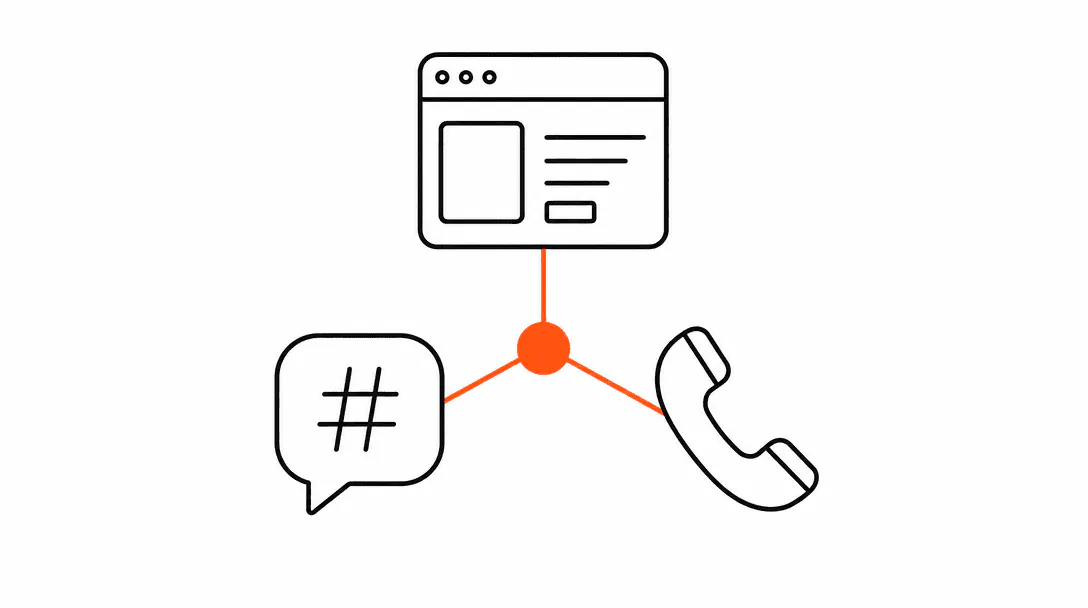
Running one AI agent across your website, your text line, and your phone line is a configuration problem, not three separate build projects. You build the brain once: the knowledge base, the persona, the rules. Then you attach channel adapters, one for web chat, one for SMS, one for voice. Each adapter delivers the same intelligence through a different surface. The customer gets consistent answers regardless of how they reach you, and every exchange lands in a single contact record so nothing falls through the gaps.
This post breaks down how that architecture actually works, why the CRM is the load-bearing piece, and where the approach breaks down if it is not set up correctly. It is part of our broader series on what agentic systems are and how they work for service businesses.
Why build one brain instead of three separate agents?
One brain means one source of truth for everything the agent knows and everything it is allowed to say. When you build three separate agents (one for chat, one for SMS, one for voice), you inherit three maintenance problems: three places to update your pricing, three places to change your hours, three places to tighten a guardrail when an agent says something wrong. Most businesses that try it end up with agents that contradict each other, because a policy updated in the chat widget never made it to the SMS tool.
The knowledge base is the core of the brain. It holds the structured information the agent draws on: your services, your prices, your booking flow, your FAQs, your off-limits topics. Think of it as a staff manual the agent reads before every conversation. When a channel adapter (web, SMS, voice) receives a customer message, it passes that message to the brain, which queries the knowledge base and produces a response, then passes that response back to the adapter for delivery in the right format: a chat bubble, an SMS message, or spoken audio.
Channel adapters handle the translation layer. Web chat sends and receives JSON payloads. SMS works over phone numbers through a carrier gateway. Voice converts text to speech and speech back to text in real time. Each adapter has its own quirks (character limits on SMS, latency tolerance on voice), but none of that touches the knowledge base or the persona. The brain stays clean and singular.
Why is the CRM the load-bearing piece of this whole system?
The CRM is load-bearing because it is the only place that persists contact context across channel boundaries. Without a shared contact record, you do not have a unified agent. You have three separate chatbots that happen to sound the same.
When we wire up the channels for a client, the first test we always run is this: does a conversation that starts on the website show up in the same contact record as the SMS thread for the same person? If the answer is no, the channels are not unified. They are just wearing the same name. That test sounds obvious, but it fails more often than you would expect, usually because the web chat vendor and the SMS tool each create their own contact objects with no bridge between them.
When it works correctly, here is what shared CRM context looks like in practice. A customer fills out your website chat on a Tuesday afternoon asking about availability. The agent captures their name and phone number, logs the conversation to a contact record, and tentatively confirms a slot. Wednesday morning, the customer texts the same number to ask a follow-up question. The agent already knows who they are (matched by phone number), already knows what they discussed, and answers without asking them to start over. If that customer later calls to reschedule, the AI receptionist handling the voice channel has the same record in front of it. One customer, one record, three touch points.
of inbound leads receive no response at all, and the average business takes 42 hours to reply to a new inquiry.
That figure is about lead response speed, not channel architecture, but the connection is direct: a unified multi-channel agent is always on and responds within seconds across every surface. The 42-hour window collapses to zero. The 23% who never hear back start getting replies.
How does per-client isolation work, and why does it matter?
Per-client isolation means each customer's context window and contact data are kept separate from every other customer's, even though the same agent brain serves all of them. It is the mechanism that prevents one customer's conversation from bleeding into another's, and it is how a single agent configuration can serve a business with multiple locations or customer segments without confusing them.
Consider a salon with three locations, each with its own pricing, staff, and booking calendar. The agent brain holds all three locations' information. When a customer contacts the Palm Beach Gardens location through the web widget, the session is scoped to that location's context. The agent answers with that location's hours, that location's stylists, that location's booking link. A different customer texting the Stuart location gets Stuart's context. The brain is shared; the context windows are not.
This also prevents a data-leakage problem that comes up in multi-tenant systems: customer A should never see information about customer B's appointment, quote, or conversation history. Isolation at the contact-record level ensures that. Each incoming message is matched to exactly one contact, the session context for that conversation is scoped to that contact, and responses are generated with only that contact's data in view.
For businesses that serve both new prospects and existing clients, isolation also lets the agent behave differently based on the contact's status in the CRM. A new lead coming through the website chat gets a warm intro and a booking offer. An existing client texting a follow-up question gets a response that acknowledges the relationship. Same brain, same persona, different context.
What do guardrails do, and how do they apply the same way on every channel?
Guardrails are the rules that define what the agent will and will not do. They are configured at the brain level and enforced across every channel automatically. This is one of the clearest benefits of the single-brain model: you write the guardrail once and it holds everywhere.
The guardrails framework for business AI agents covers this in depth, but the short version is that guardrails fall into three categories. First, there are scope guardrails: topics the agent should deflect rather than answer (competitor comparisons, specific medical advice, anything outside the business's service area). Second, there are accuracy guardrails: forcing the agent to cite only information from the knowledge base rather than generating plausible-sounding answers from general training data. Third, there are escalation guardrails: defined triggers that cause the agent to hand the conversation to a human staff member.
Without a single-brain architecture, each channel needs its own guardrails, and they drift. The voice agent starts saying something the chat widget was corrected not to say three months ago, because nobody remembered to update the voice script. A unified brain closes that gap entirely. When you tighten a guardrail in the knowledge base or the instruction set, every channel benefits immediately.
What does this look like when the old setup is broken?
A pattern we see repeatedly is the multi-vendor fragmentation problem. A med spa had a website chatbot from one vendor, a text line from a second vendor, and a phone system from a third. None of them talked to each other. Staff came in every morning and manually copied conversation notes from the chat tool into the SMS thread for any customer who had used both. If a customer had also called, there was a sticky note on the front desk.
The cost is not just time. When the chat says "we'll confirm your appointment by text" and the text line has no record of the chat, the customer either gets no confirmation or gets a generic confirmation that makes it obvious nobody read their conversation. That gap creates friction at exactly the moment the customer is deciding whether they trust you enough to show up.
The fix is not glamorous. It is connecting three channels to one CRM, configuring the agent brain once, and retiring the siloed tools. The result is that the confirmation text the customer receives references the specific service they asked about in the chat, because the CRM holds that detail and the agent brain knows to include it. Staff stop spending morning hours on data transfer and start the day with full context on every incoming inquiry, already logged.
For businesses looking to set up this kind of system, the AI text follow-up framework is a useful starting point for the SMS layer, and our guide on AI voice agents for inbound calls covers the phone side in detail.
Should you launch all three channels at once or start with one?
Start with one, ideally the channel where you lose the most leads today. For most service businesses, that is either web chat (you have traffic but no one to answer it) or SMS (you have a phone number but no automated text-back). Get one channel live, connected to the CRM, tested with real conversations. Then extend.
The architecture is designed for exactly this sequence. Because the brain is separate from the channel adapters, adding a second or third channel does not require rebuilding the knowledge base or rewriting the persona. It means configuring a new adapter and pointing it at the existing brain. A business that goes live with website chat in week one can add SMS text-back in days once the CRM connection is confirmed. The voice layer takes a bit longer because of the added complexity of speech-to-text and text-to-speech, but the underlying intelligence is already in place.
The one thing that cannot be deferred is the CRM setup. If you start with one channel and plan to add more later, the CRM integration has to be right from the beginning. Retrofitting CRM connections onto an existing deployment is harder than building them in at the start, because you end up with a backlog of contact records that were created without the unified structure and need to be cleaned up before the second channel can match them reliably.
What does the customer actually experience when this is working?
From the customer's perspective, the system is invisible in the best way. They do not think about which tool they are using. They think about whether their question got answered.
A customer who starts a conversation on your website chat and then texts you the next day gets a reply that continues where things left off. If they call, the voice agent greets them by name (because the phone number matched the contact record) and can reference the appointment they booked online. They never say "I already told you that" because they never have to repeat themselves.
That experience is the clearest signal that the architecture is working. It is also the thing that creates genuine trust, because it signals that the business is organized enough to keep track of who someone is. In a market where the average business takes over a day to respond to an inbound inquiry (HBR, 2011) and a significant share never respond at all, a business that already knows your context when you text back is a noticeably different experience.
From an operational standpoint, the staff benefit is equally real. When every channel writes back to the same CRM, your team opens a single inbox and sees the full picture for any customer, regardless of how many times that customer has switched channels. That is what agentic systems are built to do: reduce the operational overhead of managing customer conversations so that staff energy goes toward higher-value work. See how we deploy this for service businesses through our AI Automation services, which includes the multi-channel setup, CRM wiring, and ongoing support.