
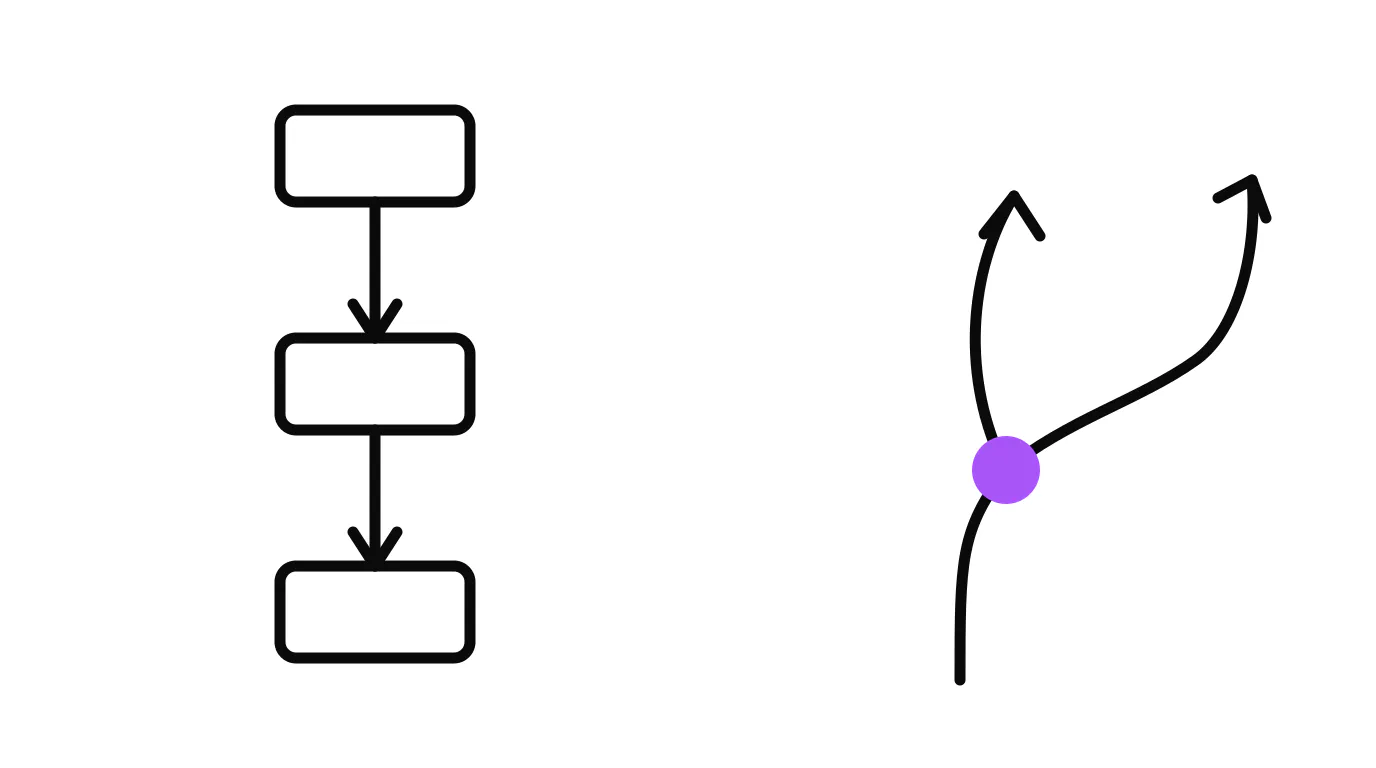
Automation follows fixed rules: if this happens, do that. An AI agent reads the situation, decides what to do, and handles things it was never explicitly programmed for. The difference sounds subtle until you are the business that chose the wrong one for the job, and now neither the system nor your team knows what to do with the exception staring at them.
This is a money question, not a philosophy one. Where does each technology return the most, and where does complexity kill the return before it starts? Small business AI adoption jumped from 39% to 55% in a single year (Thryv, 2025), which means most of your competitors are spending on something. The question is whether they are spending on the right thing for the actual problem. This guide gives you the framework to make that call for your own operation.
What Is the Difference Between AI Agents and Automation?
Automation is a railroad track: fast, reliable, and exactly as useful as the rails you laid. An AI agent is a driver who can navigate any road, but costs more per mile and moves more slowly.
A workflow automation runs a fixed sequence of steps when a trigger fires. New form submission: send confirmation email, tag the contact, notify the sales rep. Every single time, the same three steps, in the same order. It never gets tired, never forgets a step, and handles ten thousand submissions the same way it handles one. But put a submission in front of it that doesn't match the expected format, and it either errors out or silently does the wrong thing.
An AI agent receives a prompt, assesses the situation, and decides what to do. It can read an unstructured message, figure out what the person is asking, ask a clarifying question, pull in data from another system, and produce a response that fits that specific person's situation. That reasoning loop is what makes it useful for anything with real variation. It is also what makes it more expensive and slower per transaction than a well-built workflow.
The clearest way to remember the distinction: automation follows a script, an agent improvises within a goal.
What Tasks Should You Automate?
Automate any task where the input is predictable and the correct output is always the same. These are the tasks where automation beats agents on every dimension: cost, speed, consistency, and reliability.
Good candidates for automation:
- Notifications and confirmations. Appointment reminders, booking confirmations, payment receipts. The information is structured, the output is fixed, and there is no judgment required.
- Contact routing and tagging. If someone fills out a form for service type A, tag them for service type A and assign them to the right inbox. Simple conditional logic with predictable inputs.
- Follow-up sequences. Day one: send intro. Day three: check in. Day seven: last touch. This is a fixed cadence that doesn't need to read the room.
- Record updates. When a deal moves to a new stage, update the CRM record, notify the owner, create a task. All structured, all predictable.
Workers who automate tasks save an average of four hours a week on manual, repetitive work, according to Zapier's State of Business Automation report. For most service businesses, that time is sitting in manual follow-up, data entry, and notification work that a well-built workflow handles on its own.
The workers spending a quarter of their week on manual, repetitive tasks are mostly doing automation-grade work by hand. That is the first place to look before you think about agents at all. Build the railroad tracks first.
What Can AI Agents Do That Automation Cannot?
Agents handle situations where the right response depends on what the person actually said, not just on which trigger fired.
Consider a missed call. A missed-call automation sends the same text every time: "Sorry we missed your call, how can we help?" Reasonable first step. But when the person replies with something specific (they want to know if you serve their area, or they have already called three times and are frustrated), the automation has no idea what to do. It sends the same next message regardless, or stops and waits for a human who may not pick it up until morning.
An agent reads that reply and responds to the actual situation. It answers the area question. It detects urgency and flags for a callback. It recognizes a repeat contact and handles them differently. That variation is exactly what an agent handles and automation cannot. The same capability applies to after-hours lead qualification, complex customer questions, and any input that arrives as free text rather than a structured form field.
How Do You Know When to Use an AI Agent vs a Simple Workflow?
Ask two questions about the task: is the input always the same format, and is the desired output always the same? If both answers are yes, automate it. If either answer is no, an agent handles it better.
The two-by-two that makes the decision concrete: predictable input plus predictable output equals pure automation. Variable input or variable output is where an agent earns its place. The most common mistake is reaching for an agent when a workflow would do the job at a tenth of the cost. The second most common mistake is building a workflow for something that requires judgment, watching it fail on every edge case, and concluding that technology doesn't work for that problem when the real issue was the wrong tool.
Why Is After-Hours Lead Loss the Biggest Entry Point for Agents?
The clearest real-world proof point for agents in a service business is the phone call that comes in at 9pm on a Tuesday.
The pattern is consistent across lead response research: the faster you respond, the higher the conversion rate, and that gap compounds sharply once you cross the 30-minute mark. Most service businesses are not available at 9pm, which means most of those after-hours inquiries are handed directly to whoever picks up first the next morning, usually a competitor who has coverage.
A missed-call automation can send a text immediately. That is better than silence. But when the person replies with a question the automation was not built for, the conversation stalls. An agent reads the reply, answers the question, and keeps the thread alive until the lead is qualified and on the calendar. We built this capability into our own operation: our AI agent in the site chat qualifies leads and books strategy calls around the clock, and our phone line is covered by an AI voice agent that can answer questions, take messages, and book appointments at any hour. We built both because each one handles a different kind of input.
The full picture on why fast response matters is in how fast you should respond to a lead. And for the specific case of phone leads that go to voicemail, missed-call text-back is the automation layer that handles the first response, with an agent picking up where the automation leaves off.
Are AI Agents Too Expensive for Small Businesses?
For routine tasks, yes. For tasks with real variation where failure is costly, no. The honest answer requires knowing what you are comparing.
An automation costs fractions of a cent per transaction once built. An agent call costs meaningfully more per interaction because it is running a full reasoning loop. If you have ten thousand routine notifications to send per month, automating them is far cheaper than running them through an agent. The math is not close.
Where the math flips: a missed after-hours lead that would have turned into a $3,000 job costs your business $3,000 plus the acquisition cost of the lead itself. An agent that captures that conversation for a few dollars per interaction returns a multiple on its cost with a single conversion. The cost question is really a conversion question. What does a lost exception cost you, and how often does it happen?
One honest caution here: not every product marketed as an "AI agent" is one. Some are simple automations with AI-sounding names attached. Gartner predicted in June 2025 that more than 40% of agentic AI projects would be canceled by end of 2027, largely due to unclear business value and inadequate cost controls. That is worth taking seriously. The businesses most likely to cancel are the ones who bought the technology before they defined the problem. Define the problem first. Build the automation or agent that solves that specific problem. Measure whether it is working.
Can You Use Both Automation and AI Agents Together?
Yes, and the most effective systems are always a combination of both layers.
Think of it as a stack. Automation handles the high-volume, predictable work at the base: routing, tagging, confirmations, scheduled follow-up, record updates. It runs fast and cheap for everything it was built to handle. An agent sits on top of that stack and takes over when the situation requires judgment: a new lead asks a question outside the standard set, a customer reply does not fit the expected pattern, or a conversation needs to go somewhere based on what the person said rather than which trigger fired.
Say you run a home-services business in Stuart: when a new web lead comes in at 7pm, the automation fires immediately, sending a confirmation and tagging the contact. The agent picks up if the lead replies with a question the form never captured. If the lead goes quiet, the automation runs the follow-up cadence. If the lead re-engages with something complex, the agent steps back in. Neither system is doing the other's job. Both are doing exactly what they are built for.
The full picture of how these systems connect is on the page. For the specific pattern of wiring lead response from first touch through qualification, see why service businesses lose leads.
What Happens When Automation Hits a Case It Was Not Built For?
It either errors silently, sends the wrong message, or stops entirely and waits for a human who may never come. Every automation is only as good as the rules it was built for. The moment a real situation falls outside those rules, the system errors, takes the wrong branch, or sends a generic fallback that does not fit. All three outcomes lose the lead.
The answer is not to avoid automation. It is to know your edge cases before you build. Map the most common exceptions: after-hours inquiries, replies that don't fit the expected pattern, situations where the next step depends on information you don't have yet. Build automation for the predictable path and place an agent specifically on the gaps that cost you when they go wrong.
Follow-up is a useful example. Most businesses stop following up after one or two touches because the next step isn't clear. A cadence handles the contacts who just need a reminder. An agent handles the conversation that went quiet because the person had a question no one answered. We break down the right number of follow-up touches in how many times to follow up with a lead.
What Is the Plain Decision Checklist?
Automate it when: the same trigger always calls for the same response, the input is structured, and an error on one transaction is low cost.
Use an agent when: the input is unstructured (free text, voice, open questions), the right response depends on what the person actually said, or the cost of a wrong response is high (a qualified lead lost after hours).
Use both when: you have high-volume predictable work alongside a subset of conversations that need judgment. Let automation run the volume cheaply; let the agent handle the edge cases that determine whether you keep the customer.
For the call-or-text question on a new lead, text or call a new lead walks through when each channel fits. For how an agent handles day-to-day coverage, AI receptionist for small business shows what a purpose-built agent actually does.
What Is the Short Version?
Automation is fast, cheap, and exact. Most businesses are not close to automating everything they could, so that is the right first investment for most owners. Agents earn their place only where variation and judgment matter: after-hours lead qualification is the clearest entry point. The lead shows up when no one is available, says something specific, and either gets a real response or calls the next name on the list.
Start with automation for your highest-volume predictable work. Measure where the exceptions cost you most. Build the agent for that specific gap. The page lays out how we build and connect both layers. Or see what this would look like for your operation. If getting found online is the top-of-funnel gap feeding everything else, local SEO and AI search visibility is where to start.